
Tracking your brand in Perplexity AI does not require an expensive enterprise platform. You can build a useful baseline by testing repeatable prompts, recording brand mentions and citations, checking referral traffic, and using a small number of free visibility tools.
The important point is consistency. Perplexity answers can change between searches, locations, and dates. A single appearance is encouraging, but it is not a stable ranking. Track the same questions over time and look for patterns.
Quick Answer: How Can You Track a Brand in Perplexity for Free?
Use a spreadsheet to monitor a fixed set of buyer questions in Perplexity. For each search, record whether your brand is mentioned, whether your website is cited, which page receives the citation, how the brand is described, and which competitors appear. Then compare the results every two to four weeks. You can supplement this manual audit with Ahrefs’ free AI Visibility Checker, SE Ranking’s free AI visibility checks, and referral data in Google Analytics 4.
What Does Perplexity Brand Tracking Measure?
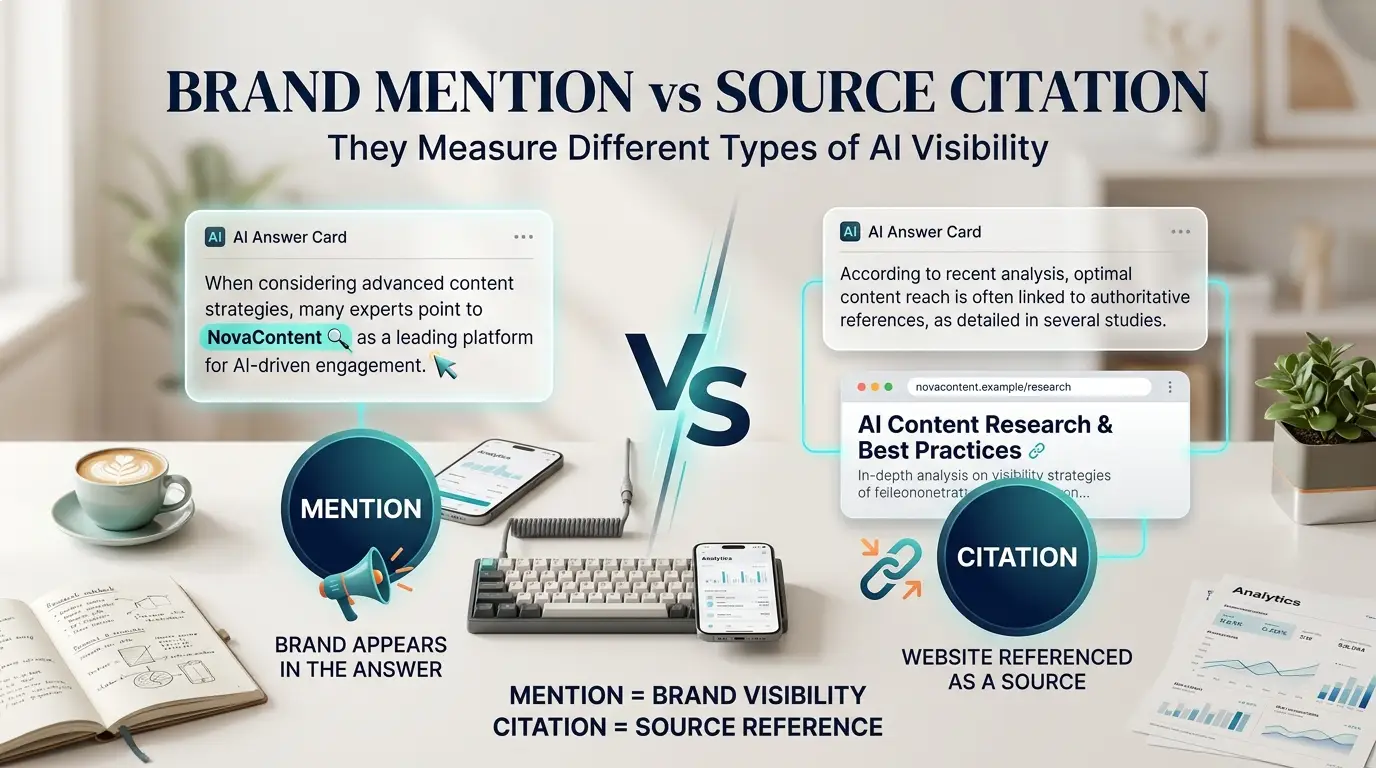
Perplexity brand tracking measures how often and how accurately a brand appears in answers generated by Perplexity. It is broader than traditional keyword rank tracking because an answer may mention a company without linking to it, cite a page without naming the brand prominently, or recommend a competitor instead.
| Metric | What It Tells You |
|---|---|
| Brand mention | Whether Perplexity names your company, product, or website. |
| Website citation | Whether a page from your domain appears among the cited sources. |
| Cited landing page | Which article, product page, or guide Perplexity selected. |
| Answer position | How early the brand or citation appears in the response. |
| Brand description | Whether the answer describes your brand accurately and positively. |
| Competitor presence | Which alternatives appear when your brand does not. |
| Referral visits | Whether people click from Perplexity to your website. |
Perplexity explains that its answers include citations linking to original sources. That makes citations observable, but it does not mean every cited page receives traffic or that the same sources will appear on every run.
Method 1: Run a Manual Perplexity Brand Audit
A manual audit is the most accessible starting point for a new website or small brand. It costs nothing and forces you to examine the actual answers instead of relying on one summary score.
Step 1: Build a Fixed Prompt List
Create 10 to 20 questions that reflect how real users discover, compare, and choose solutions. Include several types of intent:
- Category discovery: What are the best AI tools for bloggers?
- Problem solving: How can a blogger fact-check AI-generated content?
- Comparison: Which AI writing tool is best for long-form blog posts?
- Recommendation: What websites provide practical AI-tool reviews for creators?
- Branded: What is BlogAILab and what topics does it cover?
- Competitor comparison: BlogAILab alternatives for AI-tool research.
Avoid using only branded prompts. Someone who already types your brand name is testing recognition, not whether the platform discovers you for a non-branded need.
Step 2: Keep the Test Conditions Consistent
Record the date, exact prompt, country, device, and whether you used a signed-in session. Do not change several variables at the same time. Perplexity can return different sources between runs, so consistent conditions make the comparison more useful.
Step 3: Record Mentions and Citations Separately
A mention and a citation are not the same result. Mark each of these independently:
- Brand mentioned: yes or no
- Website cited: yes or no
- Exact cited URL
- Where the mention appears in the answer
- Competitors mentioned or cited
- Accuracy of the brand description
- Important missing information
Step 4: Save Evidence
Copy the answer URL when available and save a screenshot. Evidence helps you compare changes without relying on memory. It is especially useful when a later answer stops citing a page that appeared previously.
Method 2: Audit Perplexity Citations and Source Pages
Perplexity’s citations show which sources support an answer. Open every citation attached to a relevant response and categorize it as your website, a competitor, an independent publisher, an official product page, or another source type.
For competitor pages that appear repeatedly, compare:
- How directly the page answers the question
- Whether it contains original examples, tests, or data
- How clearly the product, author, and update date are identified
- Whether important claims link to primary sources
- How headings and short answer sections are structured
- Whether the content is current and easy to crawl
Do not copy the competing page. Use the comparison to identify missing evidence, unclear explanations, outdated details, or unanswered subtopics in your own content.
Official source: Perplexity Help Center — How Perplexity Works
Method 3: Check Perplexity Referral Traffic in Google Analytics 4
A citation becomes more valuable when it sends an interested visitor to your website. Google Analytics automatically records many visits that arrive through third-party domains as referral traffic.
- Open Google Analytics 4.
- Go to Reports → Acquisition → Traffic acquisition.
- Change the primary dimension to Session source / medium.
- Search for “perplexity” and review the related sessions.
- Add the landing-page dimension to identify which pages received visits.
Not every visit will be attributed perfectly. Privacy settings, apps, browser behavior, and missing referral information can cause some traffic to appear as direct or another channel. Treat referral sessions as one signal, not a complete count of Perplexity exposure.
Official source: Google Analytics Help — Referral Traffic
Method 4: Use Ahrefs’ Free AI Visibility Checker
Ahrefs provides a free AI Visibility Checker that can test whether a brand is mentioned or cited across several AI platforms, including Perplexity. The public checker does not require signup and is useful for a quick external snapshot.
Enter the brand name the way customers normally write it. Check the report for mentions and citations, then save the result with the date. A free snapshot is useful for discovery, but it is not a substitute for your own prompt set or continuous monitoring.
Try the official Ahrefs AI Visibility Checker
Method 5: Use SE Ranking’s Free AI Visibility Checks
SE Ranking advertises a free AI visibility checker that accepts a domain and competitors. Its current public page states that users can run up to five free checks per day. The snapshot can help identify mentions, links, and competitor visibility across supported AI systems.
Use the same domain and competitor set for repeated checks. Save the date and results because free tools can change their limits, coverage, or methodology.
Try the official SE Ranking AI Visibility Checker
Method 6: Use Google Search Console as Supporting Evidence
Google Search Console does not report your brand’s Perplexity mentions. However, it can show whether the pages you want Perplexity to discover are indexed, earning impressions, and receiving clicks from Google.
Use Search Console to check:
- Whether the preferred URL is indexed
- Which queries already surface the page
- Whether impressions are increasing after an update
- Whether the title earns clicks
- Which related questions deserve dedicated sections
This does not measure Perplexity directly. It helps confirm that the page is accessible, relevant to real searches, and building visibility in the wider search ecosystem.
Free Perplexity Brand-Tracking Template
Create a spreadsheet with one row for each prompt and use the following columns:
| Column | Example |
|---|---|
| Date | September 20, 2026 |
| Prompt | Best AI-tool websites for bloggers |
| Brand mentioned? | Yes / No |
| Website cited? | Yes / No |
| Cited URL | Full landing-page URL |
| Answer position | First, middle, or last |
| Competitors | Names and URLs |
| Description accurate? | Accurate / incomplete / incorrect |
| Evidence | Screenshot or answer link |
| Next action | Update page, add evidence, or monitor |
How Often Should You Check Perplexity Visibility?
For a small website, checking every two to four weeks is usually more useful than checking every day. Daily manual checks create noise and consume time that could be spent improving the underlying content.
Run an additional check after a major article update, new product launch, brand-name change, important digital PR mention, or technical indexing fix. Keep the same core prompt set so you can compare like with like.
How to Improve Your Chances of Appearing in Perplexity
No technique can guarantee a Perplexity mention or citation. The practical goal is to make your brand and content easy to understand, verify, and use as a source.
Clarify Your Brand Entity
Use a consistent brand name, author identity, About page, contact information, and organization schema. Explain clearly who the content is for and what expertise or testing supports it.
Publish Direct, Evidence-Based Answers
Answer important questions early. Support time-sensitive claims with official sources, show testing details when you actually tested a tool, and distinguish observation from marketing claims.
Create Strong Topic Clusters
Connect related guides with descriptive internal links. A clear cluster helps readers and crawlers understand that several pages belong to one area of expertise.
Keep Important Pages Current
Review pricing, feature support, free limits, screenshots, and outbound sources. Remove expired claims and clearly disclose when something has not been tested firsthand.
Earn Independent Mentions
Useful research, original comparisons, expert contributions, and legitimate media mentions can strengthen the wider evidence available about a brand. Avoid buying low-quality links or manufacturing fake reviews.
Common Perplexity Tracking Mistakes
- Checking only the brand name: This does not test non-branded discovery.
- Treating one answer as a permanent rank: AI answers can change between runs.
- Combining mentions and citations: Track them separately.
- Using vague prompts: Build prompts around real audience problems and buying situations.
- Ignoring competitors: Competitor sources reveal what the answer currently trusts.
- Changing the prompt list every week: Keep a stable core set for comparison.
- Assuming visibility equals traffic: Check referral sessions and landing pages.
- Publishing generic AI text: Add original experience, evidence, and editorial review.
A Simple 30-Day Tracking Plan
- Day 1: Choose 15 prompts and three genuine competitors.
- Day 2: Run the baseline audit and save every cited URL.
- Day 3: Check Ahrefs and SE Ranking free snapshots.
- Week 1: Improve the most relevant page using accurate sources and clearer answers.
- Week 2: Strengthen the About page, author information, and internal links.
- Week 3: Review GA4 referral traffic and Search Console landing-page data.
- Day 30: Repeat the original prompts under the same conditions and compare results.
Frequently Asked Questions
Can I track my brand in Perplexity for free?
Yes. Use a fixed prompt list, a spreadsheet, citation checks, GA4 referral data, and free visibility checkers. Paid tools mainly save time and provide scheduled history at a larger scale.
Does Perplexity show website sources?
Yes. Perplexity answers include citations linking to original sources. Open the citations to see whether your domain or a competitor’s page supported the answer.
Is a Perplexity mention the same as a citation?
No. A mention names the brand in the answer. A citation links to a source page. A result may contain one without the other.
Can Google Search Console track Perplexity mentions?
No. Search Console measures Google Search performance. Use it as supporting evidence for indexing, queries, impressions, clicks, and landing-page opportunities.
How frequently should a small brand check Perplexity?
Every two to four weeks is a practical starting point. Also recheck after meaningful content, technical, or brand changes.
Do free AI visibility tools replace manual testing?
No. They provide useful snapshots, but they may use different prompts, locations, and methodologies. Manual testing lets you monitor the questions that matter most to your audience.
Related AI Search Guides
- Best Perplexity Rank Tracker Tools for AI SEO
- AI Search Engine Optimization Services
- How to Boost Visibility in AI Search
- How to Check Brand Mentions in ChatGPT
- How to Track Brand Mentions in Gemini
Conclusion
You can track your brand in Perplexity AI without paying for a large monitoring platform. Start with a stable prompt list, separate mentions from citations, record competitors and source pages, and compare the same tests over time. Add GA4 referral data and free third-party snapshots to make the audit more complete.
The result is not a universal Perplexity ranking. It is a repeatable record of how your brand appears for the questions that matter. Use that evidence to improve accuracy, topical coverage, original value, and the pages most likely to help your audience.